frp_0.44.0_linux_amd64.tar.gz
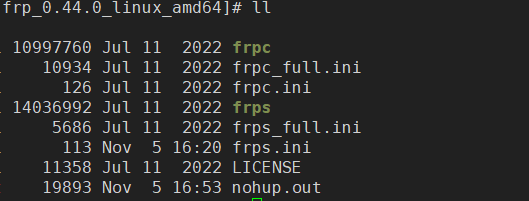
Frp解压后文件:
服务端配置
编辑服务端配置文件
[common]
# 服务端端口
bind_port=YOUR_SERVER_PORT
# 验证令牌
token=YOUR_SERFVER_TOKEN
|
客户端配置
编辑客户端配置
[common]
server_addr=YOUR_SERVER_ADDR
server_port=YOUR_SERVER_PORT
token=YOUR_SERFVER_TOKEN

# 转发服务名,格式:[server_name]
[YOUR_REDIRECT_NAME]
# 协议:tcp 等
type = tcp
# 服务端代理端口
remote_port = 8818
# 客户端转发地址
local_ip = 127.0.0.1
# 客户端转发端口
local_port = 8088
|
FRP服务端/客户端启动
命令启动
当前窗口控制台方式启动(ctrl+c 退出控制台则关闭)
后台挂起启动
nohup ./frps -c frps.ini &
|
Linux下以服务方式启动
例:服务端
创建服务文件
vi /lib/systemd/system/frps.service
|
文件内容
[Unit]
Description=frps service
After=network.target syslog.target
Wants=network.target

[Service]
Type=simple
ExecStart=/root/frp/frps/frps -c /root/frp/frps/frps.ini

[Install]
WantedBy=multi-user.target
|
服务命令
systemctl enable frps #设置开机自动启动
systemctl disable frps #取消开机自动启动
systemctl start frps #开启frps服务
systemctl stop frps #关闭frps服务
systemctl restart frps #重启frps服务
|

 微信
微信 支付宝
支付宝