问题描述
在一个项目中,需要使用到国密做加密,目前项目中存在引入一个XXX.jar中已经依赖了
<dependency>
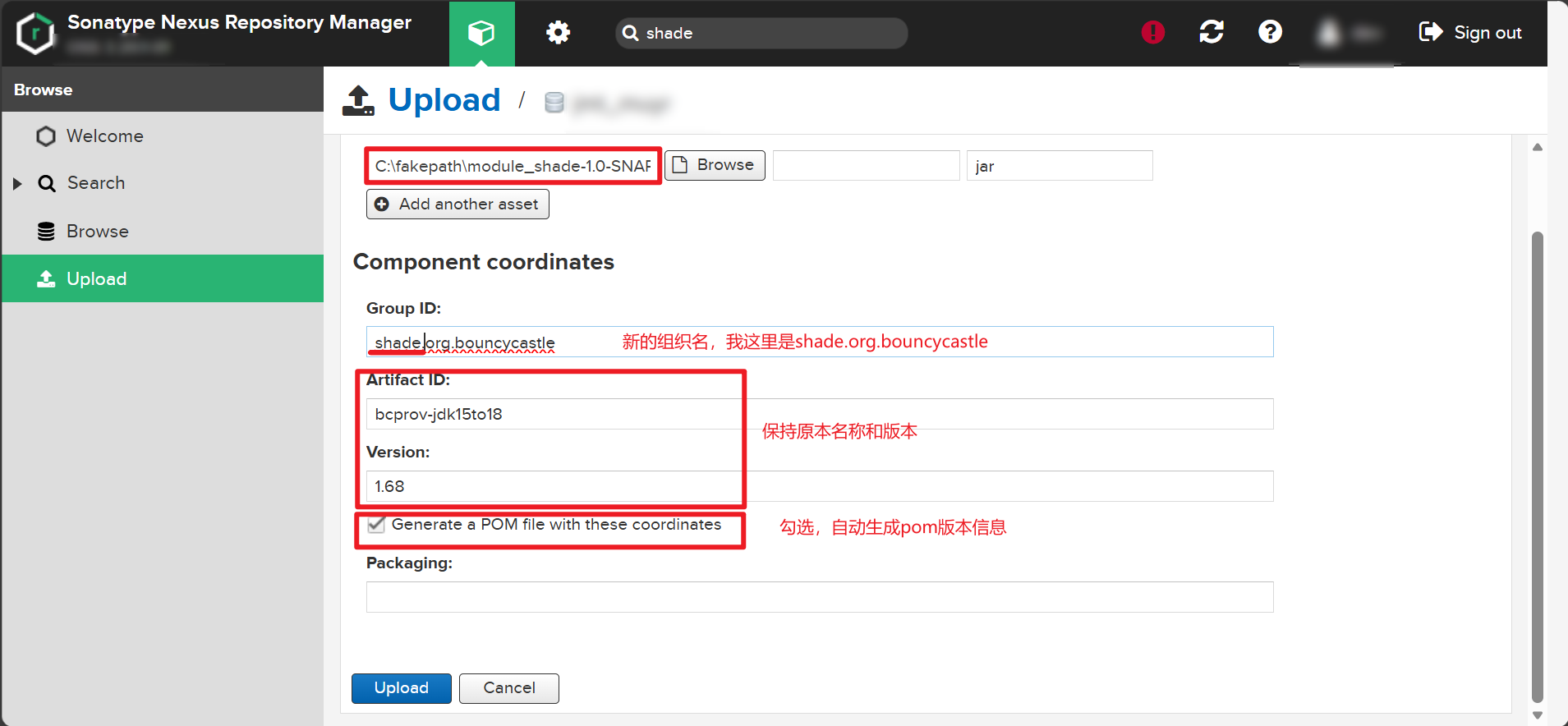
    <groupId>shade.org.bouncycastle</groupId>
    <artifactId>bcprov-jdk15to18</artifactId>
    <version>1.60</version>
</dependency>
|
我这边SM2的工具类中使用的方法是
<dependency>
    <groupId>shade.org.bouncycastle</groupId>
    <artifactId>bcprov-jdk15to18</artifactId>
    <version>1.68</version>
</dependency>
|
由于低版本的在其他模块中使用到比较多,不敢轻易升级,怕引出其他的问题。
经过网上查询得知,可以通过 maven-shade-plugin重新构建新jar包方式曲线达成目的。
准备工作
新建一个空的项目模块,需要包含pom.xml即可。
如果是在当前多模块项目中创建,则需要注意:
- 将模块从项目maven中移除,右键项目-maven-unlink maven projects
- 在项目根目录下的pom.xml,需要移除当前 模块 ,防止被打包到项目中
插件配置参考
<?xml version="1.0" encoding="UTF-8"?>
<project xmlns="http://maven.apache.org/POM/4.0.0"
         xmlns:xsi="http://www.w3.org/2001/XMLSchema-instance"
         xsi:schemaLocation="http://maven.apache.org/POM/4.0.0 http://maven.apache.org/xsd/maven-4.0.0.xsd">
    <modelVersion>4.0.0</modelVersion>
    <parent>
        <groupId>org.xxx.com</groupId>
        <artifactId>your_project</artifactId>
        <version>1.0-SNAPSHOT</version>
    </parent>

    <artifactId>module_shade</artifactId>

    <properties>
        <maven.compiler.source>8</maven.compiler.source>
        <maven.compiler.target>8</maven.compiler.target>
        <project.build.sourceEncoding>UTF-8</project.build.sourceEncoding>
    </properties>


    <dependencies>
        <!--国密,加密-->
        <dependency>
            <groupId>org.bouncycastle</groupId>
            <artifactId>bcprov-jdk15to18</artifactId>
            <version>1.68</version>
        </dependency>
    </dependencies>

    <build>
        <plugins>
            <plugin>
                <groupId>org.apache.maven.plugins</groupId>
                <artifactId>maven-shade-plugin</artifactId>
                <version>3.5.0</version>
                <executions>
                    <execution>
                        <phase>package</phase>
                        <goals>
                            <goal>shade</goal>
                        </goals>
                        <configuration>
                            <!-- 创建精简的pom文件 -->
                            <createDependencyReducedPom>true</createDependencyReducedPom>
                            <dependencyReducedPomLocation>
                                ${project.build.directory}/dependency-reduced-pom.xml
                            </dependencyReducedPomLocation>

                            <!-- 可选:重命名 BouncyCastle 避免冲突 -->
                            <relocations>
                                <relocation>
                                    <pattern>org.bouncycastle</pattern>
                                    <shadedPattern>shaded.org.bouncycastle</shadedPattern>
                                </relocation>
                            </relocations>

                            <!-- 重点:只包含项目自身和 BouncyCastle 依赖 -->
                            <artifactSet>
                                <includes>
                                    <!-- 包含当前项目 -->
                                    <include>${project.groupId}:${project.artifactId}</include>
                                    <!-- 包含所有 BouncyCastle 相关依赖 -->
                                    <include>org.bouncycastle:*</include>
                                </includes>
                            </artifactSet>

                            <!-- 启用最小化 -->
                            <minimizeJar>true</minimizeJar>

                            <!-- 确保 BouncyCastle 的所有类都被包含 -->
                            <filters>
                                <filter>
                                    <artifact>org.bouncycastle:*</artifact>
                                    <includes>
                                        <include>**</include> <!-- 包含所有类 -->
                                    </includes>
                                </filter>
                                <!-- 可选:包含其他必要的依赖 -->
                                <filter>
                                    <artifact>${project.groupId}:${project.artifactId}</artifact>
                                    <includes>
                                        <include>**</include>
                                    </includes>
                                </filter>
                            </filters>

                            <!-- 配置主类(如果有) -->
                            <!--<transformers>-->
                            <!--    <transformer implementation="org.apache.maven.plugins.shade.resource.ManifestResourceTransformer">-->
                            <!--        <mainClass>com.yourcompany.MainClass</mainClass>-->
                            <!--    </transformer>-->
                            <!--</transformers>-->
                        </configuration>
                    </execution>
                </executions>
            </plugin>
        </plugins>
    </build>

</project>
|
在当前模块下,进入到命令行中,进行打包
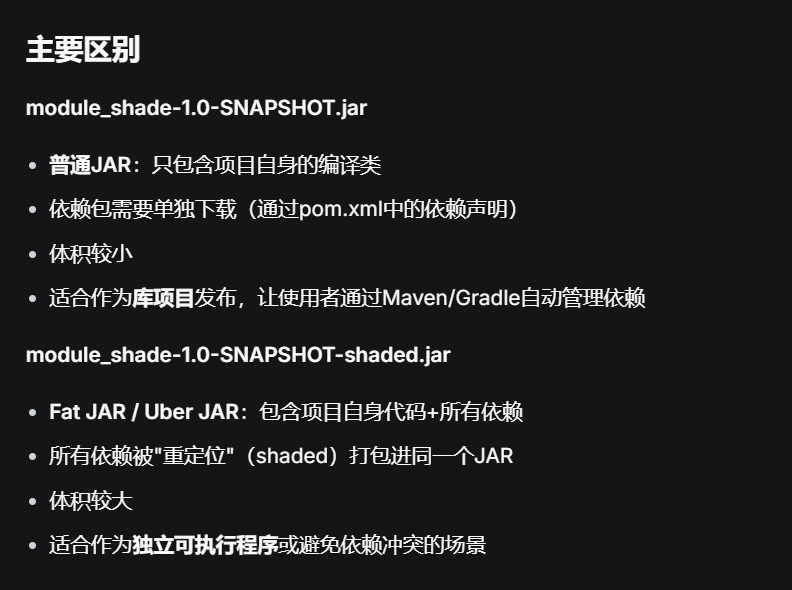
打包会得到例如module_shade-1.0-SNAPSHOT.jar文件
*.jar 和 *-shade.jar 区别如下:
通过Nexus私库上传
使用方式
原项目中import包名是org.bouncycastle.*
需要变更为shade.org.bouncycastle.*
相关参考
https://blog.csdn.net/hff133133/article/details/126946153
https://blog.csdn.net/MrwangDQ/article/details/131765647
https://developer.aliyun.com/article/1319179
https://www.cnblogs.com/youzhibing/p/18387710
https://www.cnblogs.com/code-blog/p/15507326.html

 微信
微信 支付宝
支付宝